


Compare GitGuardian to
See for yourself how TruffleHog Open Source secrets scanning CLI, fares against GitGuardian’s code security platform.

We have tried a bunch of open-source solutions, the biggest one being TruffleHog Open Source. The main reason for switching was the lack of good detection. It pretty much thinks any complex string is a password, so the signal-to-noise ratio was extremely high. That was a huge toil for us, trying to tune it and get rid of all the noise so the engineers could actually work.
Don M., Security Engineer

Why users prefer GitGuardian
While choosing a single vendor like GitHub Advanced Security may be convenient, it limits your ability to choose specialized vendors with more extensive coverage in specific security disciplines, such as GitGuardian for secrets scanning.
Don't be the dev who caused the breach
Cursor, Claude Code, Copilot. They write credentials into history files, transcripts, and configs you'll never check. ggshield finds existing ones. AI agent hooks stop new ones.
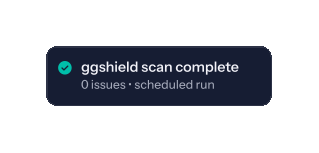
Close the gap pre-commit hooks can't reach
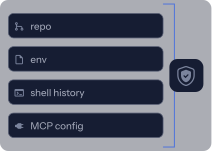
Secrets in .env, history files, and AI agent caches never hit a repo. Your pipeline scanners never see them. GitGuardian does.
Know what was stolen before infostealers use it
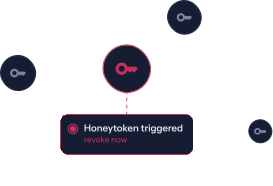
A machine is compromised. GitGuardian surfaces every credential on it, ranked by severity. You know what was stolen and what to revoke first.
.svg)
GitGuardian vs.
The long version

Why does it matter?
{{group.name}}

Regular expressions to match known, distinct patterns
550+ types of specific and generic secrets supported with high accuracy level.
515 total provider patterns including 7 generic detectors, plus custom patterns.
Regular expressions result in fewer false alerts. Additionally, known patterns make it simpler to verify if the secret is true or false or whether this is a test or example key.
Learn more about how GitGuardian detects secrets.
The space is evolving quickly, and we do our best to keep information on our competitors up to date. If you see any outdated information, contact us and we will immediately set the record straight!
How do users like you rate us?
Users rate GitGuardian high on these categories on review sites like PeerSpot, G2, and Capterra.

Ease of Use • 4.6 stars
Customer Service • 4.6 stars
Value for Money • 4.6 stars

Ease of Use • 9.1
Quality of Support • 9.2
Ease of setup • 9.5

Ease of Use • 9.1
Quality of Support • 9.2
Ease of setup • 9.5

.svg)



.svg)

.svg)

Subscribe to our newsletter
Receive the latest content and updates from GitGuardian.
Platform
Explore
Core detection capabilities
Regular expressions to match known, distinct patterns
✅ %ndet%+ types of specific and generic secrets supported with high accuracy level.
✅ Checks the validity of %nvck%+ types of exposed secrets.
✅ TruffleHog Open Source v3 covers 800+ types of specific secrets.
✅ Ability to check the validity of all types of supported specific secrets.
Regular expressions result in fewer false alerts. Additionally, known patterns make it simpler to verify if the secret is true or false or whether this is a test or example key.
High entropy checks to match credentials without distinct patterns and enter “paranoid” mode
++ Yes, based on the combination of entropy checks and contextual analysis of the presumed secret (pre/post-filters).
++ GitGuardian currently supports %ngdet%+ types of generic secrets.
❌ TruffleHog Open Source v3 does not support entropy checkslink to GitHub repo.
In order to capture a considerably wider variety of secret types, high entropy should be employed.
Custom patterns
++ Yes, supported with the use of regular expressions (in SaaS/Self-hosted versions).
✅ Yes, the library of detectors can be extended by developers.
To find company-specific secrets that are not picked up by the default patterns, you should be able to define your own patterns.
Detector activation/deactivation
++ Detectors can be individually activated/deactivated from the UI, in the workspace settings.
++ Detectors can be deactivated from the CLI using options/command flags.
We recommend keeping all detectors active to avoid missing any hardcoded secrets.
Sensitive file names
++ 22 file names raise policy break alerts.
❌ No sensitive file names are detected.
There is a very lengthy list of extensions that potentially hold secrets due to the numerous programming languages, frameworks, and coding standards that are used globally.
Sensitive file extensions
++ 14 extensions raise policy break alerts.
❌ No sensitive file extensions are detected.
Secrets are frequently discovered in file extensions together with environment variables and configuration data. Learn more.
Filepath exclusions
++ Yes, excluding paths is possible through the UI. GitGuardian recommends a set of exclusions (e.g. test directories) and enables users to test filepaths against the active exclusion list.
✅ Yes, excluding paths like test directories is possible using the CLI command flags/options.
The ability to reduce the number of incidents and concentrate solely on those that matter most is critical to scaling your secrets detection and remediation program.
Scanning multiple sources
Code repositories
++ Secrets scanning is possible for local Git repositories or repositories managed through GitHub, GitHub Enterprise, GitLab, Azure DevOps, and Bitbucket Server/Data Center.
🟠 Secrets scanning is possible for local Git repositories or repositories managed through GitHub, GitLab, or Azure Repos.
Your repositories contain secrets and sensitive data, such as user passwords or other security flaws, making it possible for anybody with access to the image to obtain that secret and perhaps exploit it to gain access to other systems.
Docker images
++ Yes, Docker images can be scanned with the GitGuardian CLI, ggshield, using a specific command. The Dockerfile, build arguments, and the image's layers' filesystem are scanned for secrets.
++ Supported
Your Docker image can wind up containing a private SSH key, an AWS access token, or a password.
Logs
🟠 The GitGuardian REST API and CLI, ggshield, support scanning all types of text input for secrets. GitGuardian can provide wrappers (code snippets) to extract and load data from observability tools or CI/CD logs.
🟠 TruffleHog Open Source v3 supports syslog, CircleCI, Travis CI, and Jenkins build logs scanning for secrets.
Sensitive data may unintentionally leak from your server logs when services unintentionally output sensitive data.
Other sources
++ Yes, we are currently supporting the scan of %external sources scanned for secrets%.
✅ The CLI has a specific subcommand for the following sources: AWS S3, filesystem (files and directories), syslog, CircleCI build logs, GCS (Google Cloud Storage).
Sensitive data may unintentionally be leaked in other productivity tools used by developers.
Monitoring perimeter
GitHub Enterprise
Instance level
++ Yes
🟠 Organization and repository level supported via endpoint flag; instance-level auto-discovery not available.
GitHub Enterprise
Organization level
++ Yes, native GitHub App at the organization level (one-click integration).
✅ Yes.
Repository level
++ Yes, upon integration of a GitHub Enterprise organization, admins can choose to - give access to select repositories - provide access to all repositories (present and future repositories).
✅ Yes.
GitHub
Organization or Repository level
++ Yes, native GitHub App available. Admins can:
- give access to select repositories
- give access to all repositories (present and future repositories).
✅ Yes.
GitLab
Instance level
++ Yes, a native integration is available. GitGuardian needs a Personal Access Token with an Admin scope.
❌ Not supported.
GitLab
Project or Repository level
++ Yes, a native integration is available. GitGuardian needs a Personal Access Token with an Admin scope to establish a webhook with the VCS for historical and real-time scanning.
✅ Yes.
Bitbucket Server/Data Center
Instance level
++ Yes, a native integration is available. GitGuardian needs a Personal Access Token with an Admin scope to set up a webhook with the VCS for historical and real-time scanning.
❌ Not supported.
Bitbucket Server/Data Center
Project level
++ Yes, a native integration is available. GitGuardian needs a Personal Access Token with an Admin scope to set up a webhook with the VCS for historical and real-time scanning.
❌ Not supported.
Azure DevOps (Repos)
Instance level
++ Yes, a native integration is available. GitGuardian needs a Personal Access Token with an Admin scope to set up a webhook with the VCS.
++ Supported.
Azure DevOps (Repos)
Project or Repository level
++ Yes, a native integration is available. GitGuardian needs a Personal Access Token with an Admin scope to set up a webhook with the VCS.
++ Supported.
Secure the SDLC and more
Developer Endpoint Protection
++ Regularly scheduled scanning of developer workstations via ggshield — covering .env files, cloud credential stores (~/.aws, ~/.gcp), AI agent and MCP configs, shell history, and application logs. Deployed via MDM (Intune, Jamf). Findings feed directly into the GitGuardian incident workflow, NHI identity map, and SIEM/SOAR. Honeytokens can be deployed on workstations to detect live credential theft in real time.
Filesystem scanning available via CLI (trufflehog filesystem), but no fleet management, no MDM deployment, and no incident lifecycle management — basic Jira and Slack integrations exist but without severity scoring, deduplication, or escalation workflows. TruffleHog GCP Analyze shipped in November 2025; AWS and Azure equivalents were announced as roadmap and remain unshipped as of June 2026. No honeytoken-based breach detection.
Developer machines are the most overlooked credential exposure layer. Secrets in .env files, cloud credential stores, and AI agent configs never reach your repos or CI — they're invisible to commit-time scanning. Developer Endpoint protection closes that gap.
NHI Governance
++ Centralised NHI inventory covering service accounts, OAuth apps, API keys, CI/CD tokens, and AI agent credentials across 8 secrets managers, 2 cloud IAM systems (with overprivilege detection for AWS IAM and Azure Entra ID), 2 identity providers, and 7 SaaS platforms. Includes policy checks for leaked, cross-environment, reused, long-lived, and overprivileged identities, with one-click revocation from the incident view.
TruffleHog Enterprise's Analyze add-on provides post-detection identity context for leaked credentials: permissions held and accessible resources. No NHI inventory or lifecycle management.
Service accounts, API keys, and machine credentials now outnumber human identities — and most security tools ignore them. They sprawl across cloud environments, CI/CD pipelines, and SaaS platforms with no owner, no expiry, and no visibility. That's your largest unmonitored attack surface.
Historical scans
++ Yes, full repository history scan can be launched on-demand. Scanning is performed across all branches and for the entire history up to the initial commit.
✅ Yes, historical scans are run using a CLI command (audit mode).
Hardcoded secrets can hide deep in the commit history across various branches, not only the latest revision of the code.
Pre-commit
++ Yes, supported through the GitGuardian CLI, ggshield.
✅ Yes.
Pre-commit hooks put the onus on developers to keep their code free from secrets before contributing to the team’s codebase. The cost of remediation at this stage is low. Learn how to set up a pre-commit hook with GitGuardian.
Pre-push
++ Yes, supported through the GitGuardian CLI, ggshield.
✅ Yes.
Pre-push hooks put the onus on developers to keep their code free from secrets before contributing to the team’s codebase.
Pre-receive
++ Yes, supported through the GitGuardian CLI, ggshield.
In addition, a 'break-glass' option is provided to avoid blocking developer workflow in case test credentials or false positives are raised.
✅ Yes (for self-hosted VCS instances).
Pre-receive hooks are the most effective tool to prevent secrets from reaching your codebase.
Post-receive
✅ Yes, supported with the native VCS integrations (GitHub, GitLab, Bitbucket and Azure DevOps). Historical and continuous protection.
❌ Scans are launched on demand (audit mode). Users need to build their own integration to subscribe to incremental code changes in the Version Control System and use TruffleHog Open Source (v3) to scan them.
CI environment
++ Yes, the GitGuardian CLI, ggshield, runs natively with 8 different providers in total: GitHub Actions, GitLab CI/CD, Bitbucket pipelines, Azure pipelines, Jenkins CI, CircleCI, Drone CI, and Travis CI.
✅ Yes.
It is important to raise awareness around the problem of hardcoded secrets and align Dev, Sec, and Ops with Automated Security Testing (AST) in pipelines.
Learn how to use GitGuardian's Internal Secrets Monitoring in your CI workflows.
Pull requests (check runs)
& commit status checks
++ In GitHub, secrets scanning check runs can be triggered on pull requests on repositories monitored by GitGuardian. The behavior can be configured to block merging PRs containing secrets.
❌ Not supported natively.
Pull request or merge request scanning brings secrets detection to environments developers are familiar with, such as the GitHub or GitLab UI.
Enriched UI and centralization of incidents
Rich UI with all data needed for investigation and remediation
++ Unified view of incidents across all monitored sources found via the native VCS integrations.
❌ Not available in the open-source version.
It facilitates the collection of relevant data for big-picture analysis.
Security team view
(global view)
++ Rich UI/centralized dashboard for Security and Incident Response teams.
❌ Not available in the open-source version.
To accurately assess the code security posture of an enterprise, security professionals require visibility across complex, sprawling environments.
Developer/Engineering view (local view)
++ Developers can get access to incidents via the GitGuardian UI, with a scoped view on incidents shared with them.
++ An external page can be generated for the developers to view individual incident details, fill out a feedback form and possibly remediate the incident on their own with our advice.
❌ Not available in the open-source version.
Developers can view and handle their incidents most effectively with the help of intuitive dashboards.
Incident Lifecycle Management
Incident data
✅ In addition to data such as the commit sha, date, author, secrets type, location (repository, file name, line) and validity, GitGuardian provides contextual tags such as "from a historical scan", "sensitive file", "test file", "exposed publicly", "leaked publicly", "regression", "default branch", etc.
🟠 TruffleHog provides similar incident metadata but contextual tags are limited to identifying incidents found "from a historical scan".
Incident data helps you in prioritizing and investigating incidents better by giving additional context.
Automated Severity Scoring
++ GitGuardian scores the severity of incidents: "Low", "Medium", "High" or "Critical" following default rules or user-defined rules.
❌ Not supported.
Severity scoring will assist in identifying and prioritizing issues for quicker resolution.
Validity and presence checks
++ For certain secrets, GitGuardian can perform non-intrusive checks to verify their validity. When revoked, secrets will be marked as no longer valid, effectively providing proof of remediation.
++ GitGuardian can also verify the presence of the secrets in the commits and provide proof of deletion after all evidence of the secret is removed.
✅ Ability to check the validity of all types of supported specific secrets.
Users should be able to check the validity of each incident and determine whether the leaked secret is still present or has been entirely erased from the commit history. Learn how to verify if an exposed secret was removed from the commit history.
Occurrence grouping
++ GitGuardian groups all occurrences of the same secret leak across files, repositories, and organizations.
❌ Not available in the open-source version.
You can lessen alert fatigue. There is no need to triage/resolve each and every occurrence separately.
Incidents status management
++ Incident handling with "Triggered", "Assigned", "Resolved" and "Ignored" statuses. Two outcomes are possible: incidents can be resolved or ignored.
❌ Not available in the open-source version.
This will assist organizations in swiftly identifying incidents and mitigating their negative impact.
Incident assignment
++ Incidents can be assigned to a team member (a security engineer or a developer) to handle the incident.
❌ Not available in the open-source version.
Defining incident assignees makes sure that the incident gets a timely and appropriate response.
Remediation guidelines
++ Default remediation guidelines and recommendations are displayed in the UI. The guidelines can also be customized.
🟠 TruffleHog Open Source (v3) provides advice on how to rotate and revoke exposed secrets in the console output. These guidelines cannot be edited in the open-source version.
You have some remediation guidelines by default. But as each organization has its own context and remediation policies, you will have the ability to customize the remediation guidelines.
Automation and playbooks
++ Incident remediation playbooks like sharing incidents with involved developers, collecting feedback, and closing incidents when they are re-checked as invalid can be automated.
❌ Not available in the open-source version.
The time savings, particularly at the enterprise scale, can be significant. Playbooks keep your teams productive and focused!
Learn more about how to prioritize, investigate and remediate hardcoded secrets incidents at scale.
Incident timeline
++ A detailed timeline is provided with an extensive activity log of all performed events (status changes, feedback notes, access sharing, and much more).
❌ Not available in the open-source version.
Timelines help security teams keep track of all of the actions performed on the incident.
Collaboration with developers
++ Developers can get access to incidents via:
• GitGuardian workspace, scoped view on incidents shared with them;
• A link to an external page can be generated for the developers to view individual incident details, fill a feedback form and possibly remediate the incident on their own.
❌ Not available in the open-source version.
Because developers are key to taming secrets sprawl, AppSec teams must provide them with instant access to and ownership of their hardcoded secrets incidents.
Learn how to bring Dev, Sec, and Ops together for tackling secret sprawl.
Whitelisting options
++ Yes. When ignoring incidents, it is possible to flag findings as false positives, low-risk credentials, or test credentials.
❌ Not available in the open-source version.
Pull request or merge request scanning brings secrets detection to environments developers are familiar with, such as the GitHub or GitLab UI.
Regression behavior
++ New occurrences of a resolved incident can be configured to re-open the incident and trigger new alerts or deliver silent notifications.
❌ Not available in the open-source version.
If new secrets were added or rotated secrets broke existing app functionality, you need to reopen the incident.
Alerting
Real-time alerting
++ Yes
❌ Not available in the open-source version.
Serious incidents are immediately identified. Alerts may be directed to the right developers more rapidly for remediation.
Email alerts
++ Yes, to prevent alert fatigue, only one email is sent for multiple occurrences of the same incident.
❌ Not available in the open-source version.
The problem of secret leaks has developers at the forefront. It is crucial to notify the developer in charge of the incident via their commit email.
Integration with most common SIEMs or ITSMs like %third parties with gg notifications integration%
++ Yes
✅ Yes.
Teams, processes, and tools should be integrated to increase efficiency and effectiveness for all users by ensuring that alerts are received at the appropriate time and location and that no alert is missed.
Integration with ticketing systems like Jira or messaging apps like Slack
++ Yes
❌ Not available in the open-source version.
By integrating your code security platform and ticketing/messaging tool, you can address critical incidents and expedite remediation.
Event-driven generic webhooks
++ Yes
Stay in the know with event-driven alerts when new incidents are raised or when actions are performed on open incidents.
Reporting & Analytics
Analytics
++ Yes, enriched analytics to assess security posture over time and remediation performance.
❌ Not available in the open-source version.
Analytics help you assess security posture over time, and remediation performance.
Data exports
++ All data is exportable in .csv (including historical incidents) or in JSON format using the REST API.
✅ Incident data can be exported in json format.
Your Dev can review the incident data and filter it further based on their needs.
Enterprise support
Deployment
++ SaaS & On-premises (self-hosted)
✅ Self-hosted open-source CLI.
SaaS is less expensive and easier to scale, while on-premises offers more visibility.
See how an enterprise customer deployed a secrets detection program.
SSO
++ Yes, fully compatible with any SAML 2.0 provider.
❌ Not available in the open-source version.
Because users only log in once per day and utilize a single set of credentials, it decreases the number of attack surfaces.
Roles Based Access Control (RBAC) & Team management
++ Yes, the available roles "Workspace Owner", "Manager" (admin), "Member" and "Restricted" are designed for fine-grained access control down to the occurrence level. Teams management available.
❌ Not available in the open-source version.
It's a wonderful approach to bring in every developer, scale up incident remediation, and deal with orphan incidents.
Audit logs
++ Detailed activity logs of all actions triggered on the dashboard or through the REST API.
❌ Not available in the open-source version.
Audit logs include precise historical data that can be used to retrace an incident's timeline.
REST API
++ GitGuardian’s public REST API can be used to realize all sorts of actions on your workspace and incidents (retrieve, assign, update status, and share secrets incidents, and more).
❌ Not available.
This API provides you with access to all of the incident data, including tasks.
Enterprise support & onboarding
++ A dedicated team of Solutions and DevOps Engineers will be made available to help you rollout secrets detection and remediation for your organization (included in the licensing model, at no additional cost).
❌ Not available in the open-source version.
In order to use a product effectively, a solid onboarding program aids in your ability to comprehend and experience the value it offers.
It is always advantageous to have support professionals who are completely committed to fixing any technical issues you may encounter.